TIKTOK • DAILYTECH.ID - The digital landscape has shifted, and TikTok is the epicenter of the earthquake. For creators, the real power isn’t just in the 15-second viral clip; it’s in the raw, unedited connection of a LIVE stream. It’s where you turn casual viewers into a “tribe,” where you can monetize your craft through virtual gifts, and where the TikTok algorithm truly begins to prioritize your presence.
But there is a massive elephant in the room: the 1,000-follower requirement. For a new creator or a small business owner, that number can feel like a mountain. You have the gear, you have the personality, and you have the content—but the “Go LIVE” button is nowhere to be found.
Is it possible to jump the fence? The answer is a resounding yes. Whether you are an aspiring gamer looking to stream from a PC, a seller wanting to showcase products, or just a creator who wants to engage with their community early, there are legitimate, safe ways to unlock TikTok LIVE access without waiting for that 1,000-follower notification.
Quick Answer:
TikTok normally requires 1,000 followers to go LIVE, but some users can access LIVE earlier by requesting access, using TikTok LIVE Studio on PC, or joining a LIVE as a guest. Availability depends on account age, activity, and region. Linking a TikTok Shop Seller account is also a confirmed way to bypass the limit.
TikTok LIVE Requirements You Need to Know
Before we dive into the workarounds, we need to understand the “why” behind TikTok’s gatekeeping. TikTok isn’t just trying to be difficult; they are managing bandwidth and safety.
Minimum Follower Rules
Officially, the standard threshold is 1,000 followers. This is the benchmark TikTok uses to ensure a creator has a basic understanding of the platform’s community guidelines and has built a small, baseline audience that warrants a live broadcast.
Age and Region Limitations
Follower count isn’t the only gatekeeper. To host a LIVE, you must be at least 18 years old. If your birth date on your profile indicates you are younger, the LIVE feature will be disabled, regardless of your follower count. Furthermore, region plays a huge role. Some regions, like the US, UK, and parts of Europe, have stricter moderation but often get experimental features (like LIVE Studio) earlier than others.
Why Some Accounts Get LIVE Access Early
You might see a creator with only 200 followers streaming and feel a pang of jealousy. How did they do it?
- TikTok Shop Integration: Sellers often get LIVE access at 0 followers to promote commerce.
- Agency Whitelisting: Creators signed to Multi-Channel Networks (MCNs) or TikTok agencies can have features manually unlocked.
- The “Gaming” Beta: TikTok frequently invites active gamers to test their desktop software, bypassing mobile follower requirements.
Why the Go LIVE Button Is Missing on TikTok
If you’ve checked your app and the “LIVE” tab simply isn’t there, it’s usually due to one of the following roadblocks:
New Account Restrictions
If you created your account five minutes ago, don’t expect LIVE access. TikTok places new accounts in a “probationary” period to ensure they aren’t bots. You usually need at least a few days of active scrolling, liking, and posting before advanced features become eligible for activation.
Account Limitations and Violations
If you’ve had a video taken down recently for copyright or community guideline violations, TikTok may “shadow-restrict” your account. This means even if you hit the 1,000-follower mark, the LIVE button might be delayed until your account is back in “Good Standing.”
Business vs. Personal Accounts
While a Business Account offers analytics, it doesn’t automatically grant LIVE access. However, a TikTok Shop Seller Account (a specific type of business integration) is the most powerful “cheat code” to getting that button immediately.
Ways to Go Live on TikTok Without 1000 Followers
Let’s get into the “how-to.” These are the three most effective strategies for 2026.
1. Request LIVE Access From TikTok (The Support Ticket Method)
This method relies on a small loophole in the “Report a Problem” section. It essentially forces a manual review of your account.
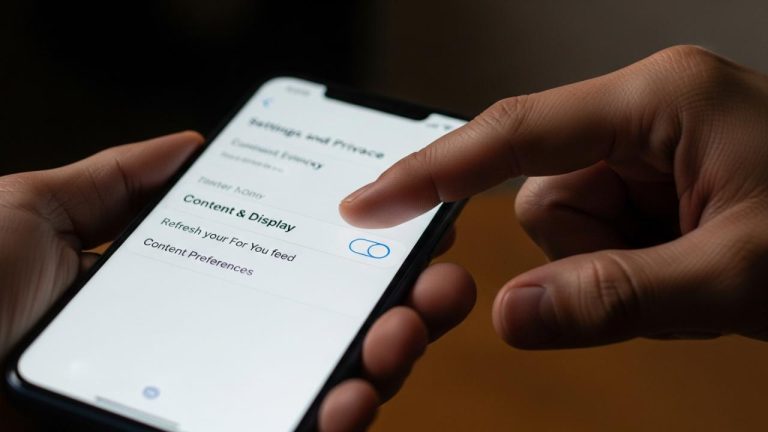
- Where to find the option: Go to Settings and Privacy > Report a Problem > LIVE > I can’t start a LIVE.
- What to submit: Don’t just demand the feature. Use a professional tone: “I am a content creator from [Your Platform/Niche] and I am looking to bring my audience to TikTok. I have noticed that the LIVE feature is not appearing on my account. Could you please check if my account is eligible for a feature unlock?”
- What usually works: This has a 40% success rate. If your content is high-quality and original, support staff may flip the switch for you.
2. Use TikTok LIVE Studio on PC
TikTok is desperate to take market share from Twitch. To do this, they’ve created TikTok LIVE Studio, a dedicated streaming software for Windows.
- The Loophole: Often, TikTok allows users to download and use LIVE Studio even if they don’t have 1,000 followers on the mobile app.
- Who can access it: Usually, if you have a history of posting gaming content or have a “Pro” account, you can apply for a 7-day trial of the software. If you stream consistently during that trial, the access becomes permanent.
- Setup: Download it from the official TikTok website, log in, and check if the “Start Stream” button is active.
3. Go Live as a Guest on TikTok
This is the most social way to “be LIVE” without having the button.
- How it works: Find a friend or another creator who is currently LIVE. Request to join their stream as a guest.
- Requirements: You don’t need any followers to be a guest.
- Strategy: This is a fantastic way to network. If you provide value on someone else’s stream, their audience will follow you, helping you reach that 1,000-follower goal organically and quickly.
How to Go Live on TikTok With No Followers (The “Shop” Secret)
If you have zero followers and need to go live today, there is only one legitimate path: TikTok Seller Center.
TikTok wants to be the next Amazon. To encourage selling, they allow anyone who registers as a “TikTok Shop Seller” to go live to promote their products.
- Download the TikTok Seller Center app.
- Register as a “Sovereign/Individual” seller using your ID.
- Once verified, link your official TikTok account to your Seller Center.
- Boom. Your TikTok account will now have the “LIVE” button, regardless of your follower count.
How to Go Live on TikTok From PC or Console
For the gamers and the tech-savvies, the mobile app is often too limiting anyway. You want the power of a desktop.
Go Live on TikTok Using PC or Laptop
If you have managed to get a Stream Key (usually through the “Report a Problem” method or by hitting 1,000 followers), you can use OBS (Open Broadcaster Software).
- OBS and Streamlabs: These tools allow you to add overlays, high-quality microphones, and professional transitions. You simply copy your “Server URL” and “Stream Key” from TikTok and paste them into your software’s settings.
Gaming LIVE Basics (PS5, Xbox)
You cannot stream directly from a console to TikTok yet. To do this, you need a Capture Card (like an Elgato). You plug your console into the capture card, the card into your PC, and then use OBS to send that footage to TikTok.
How to Go Live Without Showing Your Face
Many creators are “camera shy” but have amazing voices or skills. You don’t have to show your face to be a successful TikTok streamer.
- Audio-only LIVE: Use the guest feature or the “Gaming” mode to focus on audio. You can put up a static image or a “Starting Soon” screen.
- Screen Sharing: Perfect for tutorials or digital art. You share your phone or PC screen while you work, providing a “behind-the-scenes” look at your process.
- Gaming-only: Let the gameplay be the star. People watch TikTok LIVEs for the personality, but if the gameplay is intense, they won’t care if they can’t see your face.
How to Unlock TikTok LIVE Faster
If you want to do it the “right” way, you need to trigger the algorithm to see you as a “Premium Creator.”
- Activity Signals: Be active for at least 30 minutes a day on the app.
- Content Consistency: Post once a day for 10 days straight. TikTok’s AI rewards accounts that show commitment.
- Policy Compliance: Do not use banned hashtags or copyrighted music in your first 10 videos. Keep your record clean.
How to Restore LIVE Access if It’s Removed
It’s heartbreaking: you finally get the button, and then it’s gone.
- Temporary LIVE Bans: Usually happen for “Minor Safety” or “Unoriginal Content.” These typically last 24 to 72 hours.
- The Appeal Process: If you were banned, always appeal. Mention that you have reviewed the Community Guidelines and believe the ban was a misunderstanding.
- What to avoid: Don’t delete the video that got you banned before appealing—TikTok needs to see it to verify your claim.
FAQs – How to Go Live on TikTok Without 1000 Followers
You can use the TikTok Seller Center trick, request access via “Report a Problem,” or use TikTok LIVE Studio on a PC.
You likely haven’t met the 1,000-follower threshold, your account is too new, or your age is set under 18.
The standard rule is 1,000, but this can be bypassed by becoming a TikTok Shop Seller or using the PC LIVE Studio.
Yes, by linking your account to a verified TikTok Shop Seller Center account.
You need a Stream Key. You can get this by becoming a “Gaming Creator” on the platform or reaching the follower requirement.
The 1,000-follower rule is a hurdle, not a wall. By using the Seller Center method or the LIVE Studio software, you can start building your community today. Don’t let a number stop you from sharing your voice.