TIKTOK • DAILYTECH.ID - Frustration with irrelevant content clogging your For You Page (FYP) often leads users to ask: “how to reset tiktok algorithm” and regain control over their digital experience. Resetting the algorithm is entirely possible through several targeted methods that impact how TikTok personalizes your feed.
To effectively reset your TikTok algorithm (FYP), the primary method is using the dedicated “Refresh your For You feed” feature found in Settings and Privacy, which completely clears your viewing history and preferences. Additionally, actively clearing your viewing history, utilizing the “Not Interested” feature frequently, or starting a new account are supplementary methods to quickly recalibrate your feed’s focus based on current trends. This article outlines the official, supplementary, and device-specific methods available in 2026 to ensure you can clear and recalibrate your feed successfully.
The Official Method: Implementing a Hard Reset of the FYP
The single most effective and reliable way to initiate a full-scale algorithm overhaul is by utilizing TikTok’s proprietary feature designed specifically for this purpose. Since its rollout in 2025, the “Refresh your For You feed” feature has become the definitive answer for users asking, “how to completely reset tiktok algorithm.” This function does not merely filter content; it effectively wipes the slate clean, instructing the recommendation engine to treat your account as a new user with no established preferences.
Seeking to understand the fundamental difference between this hard reset and simpler clearing actions is key. When you refresh the feed, TikTok permanently deletes the behavioral data—the watch time, the dwell rate, and the subconscious signals—that define your current FYP matrix. The system immediately reverts to showing you generalized, highly popular, and trend-based content typical of major regions, allowing you to manually restart the learning process from zero. This feature is particularly valuable for users who have experienced a gradual but profound decay in content quality or those whose interests have dramatically shifted. If you feel trapped in a niche you no longer enjoy, this is the solution for a total tiktok algorithm reset.
Step-by-Step Guide for iPhone and Android
Users seeking a complete hard reset on their personalized content should follow these steps precisely, regardless of whether they are operating the TikTok application on an Android or an iPhone:
- Access Settings: Navigate to your Profile tab (the ‘Me’ icon) located in the bottom right corner of the TikTok app interface.
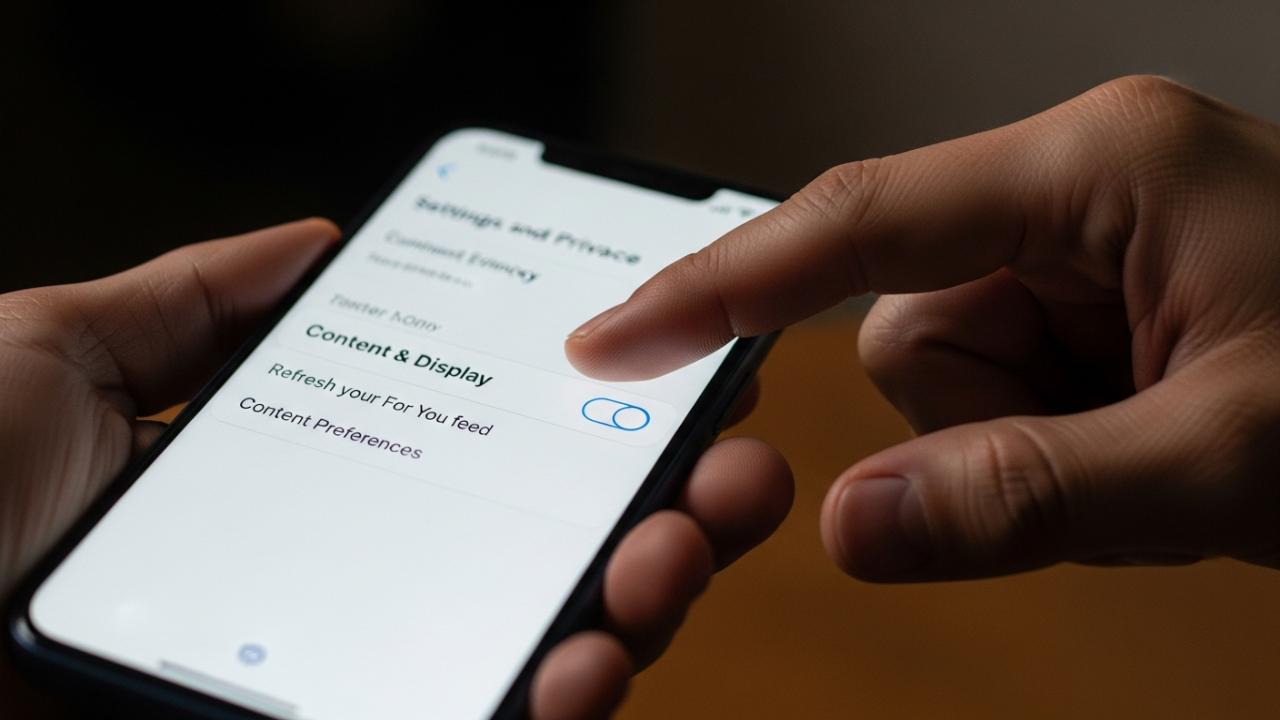
- Open Privacy Menu: Tap the three horizontal lines (often called the hamburger menu) in the top right corner. This will open the secondary navigation pane. Select “Settings and Privacy.”
- Find Content Controls: Scroll down the extensive menu until you locate the section labeled “Content & Display.” Within this cluster of options, select “Content Preferences.”
- Initiate Refresh: Within the “Content Preferences” menu, you will find and tap on the crucial option: “Refresh your For You feed.” This is the ultimate tool for those asking, “how to reset the tiktok algorithm 2025.”
- Review Warning and Confirm: TikTok will display a comprehensive warning dialogue box. This warning explains that this action is permanent; it will permanently clear your current FYP data, meaning the system will forget what you have previously liked, watched, or scrolled past. You must confirm the refresh to proceed, acknowledging that you will need to start training the new algorithm through active engagement immediately after the reset.
- Immediate Implementation: Upon confirmation, your For You Page will transition immediately. The hyper-personalized videos you were previously shown will be replaced by a general selection of content, effectively implementing a definitive hard reset tiktok algorithm.
It is important to note that while the algorithmic parameters are wiped immediately, the success of this reset depends entirely on your subsequent behavior. Treat the next 48 hours as the crucial training period for the new algorithm.
Alternative Methods to Reset the TikTok Algorithm Without Starting Over (Soft Reset)
For users who are hesitant about performing a complete algorithmic wipe—perhaps they enjoy 80% of their current content but need to eliminate a few irrelevant niches—a soft reset provides necessary recalibration without losing all established preferences. These methods are essential for users asking “how to clear tiktok algorithm” incrementally and regain focused control.
A soft reset targets specific data streams the algorithm relies on, allowing for adjustment and refinement rather than outright deletion. This approach is slower but less disruptive to the overall user experience.
Clearing Viewing and Search History
The easiest and most logical way to perform a partial soft reset is by eliminating the recent, specific data points that TikTok uses to calculate your immediate interests. Since the algorithm heavily weights recent activity, removing this history can instantly alter the trajectory of your next few hours of viewing. This is absolutely vital for users who want to know how to reset tiktok feed algorithm without touching their content preferences or saved videos.
- Access Activity Center: Navigate back to the main “Settings and Privacy” menu in the app.
- Locate History: Scroll to the “Content & Display” section and select “Activity Center.”
- Wipe Watch History: Tap on “Watch History.” Here, you will see a chronological list of every video you have viewed. Select the content you wish to forget (or select all content) and then delete it. This directly impacts the FYP’s suggestions.
- Clear Search History: Navigate back to the “Activity Center” menu and select “Search History.” Clear all cached search terms. Since searches are direct signals of interest, clearing them is crucial for how to reset tiktok search algorithm suggestions and reducing the visibility of topics you briefly explored.
Updating Interaction Habits and Using “Not Interested”
To significantly influence how to reset your tiktok algorithm quickly following history clearing, you must alter your immediate viewing habits aggressively. The algorithm prioritizes strong, real-time engagement signals over archived history.
Aggressive Use of “Not Interested”
The “Not Interested” function is the most underutilized tool for algorithm correction. It is the direct opposite of a Like, providing an explicit negative signal. When irrelevant, repetitive, or outright unwanted content appears, you must long-press the video and explicitly tap the “Not Interested” option.
For maximum impact during a soft reset period, you should:
- Be Ruthless: Use “Not Interested” consistently across all unwanted topics for 30–60 minutes. Every click is a data point the algorithm must process.
- Block Keywords: When you mark a video as “Not Interested,” TikTok often asks why. Select options that allow you to specify that you don’t want to see content from that user, sound, or, most powerfully, content related to that specific topic (often presented as a keyword filter).
Increase Watch Time on Desired Content
The single greatest input the TikTok algorithm uses is dwell time (how long you stay watching a video). If you scroll past a video quickly, the system registers a low interest signal. To train your newly cleared feed rapidly:
- Linger and Loop: Linger on videos you genuinely enjoy. Watch them multiple times by letting them loop, or intentionally scrub back to the beginning. This sends an extremely strong signal of high interest, effectively telling the system, “More content exactly like this, please.”
- Active Engagement is Secondary: While Likes and comments help, the true power lies in watch time. Prioritize watching over merely double-tapping.
Stop Engaging with Trigger Content
If you want to eliminate a certain content category, you must immediately scroll past it. Do not pause, do not like, do not comment, and most crucially, do not share videos related to the undesired topic, even if your comment is negative. Any interaction signals engagement to the system. The speed at which you scroll past is a negative signal the algorithm understands. This passive avoidance is key to resetting your content trajectory.
Adjusting Content Preferences and Categories
TikTok provides a mechanism for users to proactively filter content, a targeted approach on how to reset tiktok explore page algorithm for specific subjects you wish to avoid.
In “Settings and Privacy,” return to the “Content Preferences” section. Within this menu, you can usually find options such as “Filter Video Keywords” or “Manage Specific Interests.” By manually inputting keywords (e.g., “crypto,” “ASMR,” “political commentary”) that you no longer wish to see, you create a top-level block, forcing the algorithm to bypass broad categories regardless of your history. This manual intervention is highly effective for long-term algorithmic maintenance.
Deep Dive: Device-Specific Reset Procedures (PC and Web)
While the vast majority of TikTok consumption occurs on mobile, a significant number of professionals, creators, and casual users access the platform via desktop browsers or dedicated PC applications. These users often inquire how to reset tiktok algorithm on pc, where the mobile app’s dedicated “Refresh” feature might be unavailable or hidden.
The PC environment requires a greater reliance on traditional digital housekeeping and cross-platform synchronization of user signals.
How to Reset the TikTok Algorithm on PC
Since the core account data (history, preferences) is stored server-side, the fundamental steps for a soft reset—clearing history and adjusting preferences—are the same on PC as on mobile. However, achieving a clean slate often requires clearing local data that the browser uses to inform the feed.
- Clear Browser Cache and Cookies: This is the desktop equivalent of clearing app cache on a phone. Log out of TikTok entirely. Then, open your browser settings (Chrome, Firefox, Safari, Edge) and clear the site data and cache specifically associated with the TikTok domain. This eliminates local tracking cookies and temporary files that might influence feed loading and content delivery, offering a foundational step toward a partial reset tiktok algorithm iphone or PC consistency.
- Use Web Portal Settings: Access your Settings via the web portal by clicking your profile icon in the top right corner. The full “Settings and Privacy” suite, including “Content Preferences,” is available here. Use the content filter to actively input and manage negative keywords. This is the primary method for filtering topics on the PC interface.
- Active Engagement: While viewing on a PC, be extremely deliberate with your engagement. The desktop interface provides clear mechanisms for liking, commenting, and using the “Not Interested” feature (often accessed by hovering over the video or clicking the three dots). Frequent, explicit use of the “Not Interested” function on the desktop interface ensures those interaction signals are synchronized rapidly across all your devices, helping to recalibrate the algorithm no matter where you are viewing.
Understanding Algorithm Reset Timelines and Retraining
One of the most frequently asked questions after initiating a change is “how long does it take for tiktok algorithm to reset” fully and start showing quality content again. The answer depends heavily on the method employed.
Hard Reset Timeline (The “Refresh” Feature)
If you utilized the official “Refresh your For You feed” feature, the reset is technically instantaneous. The algorithm immediately forgets your old tastes. However, the FYP won’t magically become perfect overnight. It will revert to a general population sample.
To make the new feed hyper-relevant, you must commit to a dedicated retraining period. It typically takes 1–3 days of active, intentional viewing (ideally 1–2 hours per day) for the new algorithm to gather sufficient data points and fully learn your updated tastes. During this period, be aggressive with likes, full watches, and the “Not Interested” button. This intentional activity is how to restart my tiktok algorithm successfully.
Soft Reset Timeline (Clearing History and Engagement Shift)
When performing soft resets—clearing history, changing engagement patterns, and filtering keywords—the timeline is less immediate but often fast. Because the algorithm prioritizes recent signals, simply clearing your history often results in an immediate shift in the content served within the first few viewing sessions.
For significant, lasting changes based on clearing history and aggressive use of “Not Interested,” noticeable improvement and refocusing of your FYP should be evident within 48–72 hours. If, after this timeframe, the irrelevant content persists, it means the soft reset was insufficient, and a hard reset using the official “Refresh” feature is likely required. The key is consistency; sporadic application of soft reset tactics will yield minimal results.
FAQs – How to Reset Tiktok Algorithm
Yes, using the “Refresh your For You feed” feature found in the Settings and Privacy menu is the most definitive way to completely reset your TikTok algorithm without the need to start a new account. This process wipes all viewing history and preferences tied to your current profile.
No, deleting and reinstalling the app does not reset the algorithm, as your viewing preferences are stored server-side and tied directly to your account login, not the local application data on your device. You must actively clear the history through the account settings.
Clearing your search history is highly effective for resetting the TikTok search algorithm and removing specific topic suggestions. However, it only offers a soft reset for the main FYP, as the FYP relies more heavily on watch time and ongoing interaction history for its primary recommendations.
The core steps, including using the “Refresh your For You feed” feature and clearing watch history, are identical for both iPhone and Android users, as these functions are account-based settings handled by TikTok’s servers, not dictated by the device’s operating system.
While the reset is immediate, it typically takes 48 to 72 hours of consistent, intentional interaction (liking desired videos and selecting “Not Interested” on unwanted content) for the algorithm to fully adjust and deliver a significantly improved, focused FYP that reflects your current tastes.